


Article Contents
Start Using the Free E-Invoice Download Tool Now
If you’re looking for a fast and free way to download e-invoices, you’ve come to the right place. Many taxpayers struggle with downloading invoices one by one from the portal—so we’ll show you how to download e-invoices in bulk for free using the best available methods in 2025.
There are several ways to download e-invoices in bulk through various available tools:
1. Using the E-Invoice Download Extension (Egypt ETA PDF Tool)
This is an open-source browser extension for Google Chrome, known as the ETA Comprehensive Invoice Aggregator. It’s currently the best e-invoice download extension available, designed to simplify the process of downloading and aggregating e-invoices from the Egyptian Tax Authority portal.
Features:
- Download multiple portal invoices in bulk instead of one by one.
- Export invoices in multiple formats (Excel, PDF, CSV, JSON, XML).
- Easy to use through a simple interface integrated with the portal.
- No complex software needed—just a browser extension.
- Community support and continuous tool updates.
Installation Steps:
- Extract the tool file (ZIP).
- Open the Chrome extensions page by typing: chrome://extensions.
- Enable Developer Mode.
- Select “Load unpacked” and choose the extension folder after extraction.
- The tool icon will appear next to the address bar for quick access.
Important Notice: This tool is open-source and not officially affiliated with the Egyptian Tax Authority. Usage is at the taxpayer’s own risk.
Taxpayers who want to download their e-invoices in an aggregated manner rather than one by one can use a free Google Chrome extension called Egypt ETA PDF Tool. This extension allows you to download all invoices displayed in your account at once, in addition to exporting them to an Excel file for easy review and tracking.
How to Use:
- Install the Egypt ETA PDF Tool extension from the Chrome Web Store.
- Log in to the E-invoicing System portal.
- Search or select the time period for the invoices you want to download.
- Use the extension to download invoices in bulk or export them to Excel.

2. Downloading Invoices in Excel Format (ZIP or CAB) from the Portal
To streamline procedures for taxpayers, the Egyptian Tax Authority has updated the process for requesting portal access to issue e-invoices. You can now submit your request in one of two ways:
Via Email:
- Send an email to the relevant tax office email.
- The email should include the taxpayer’s information, company address, and a completed portal request form.
- The request must be sent from the same email registered in the system enrollment request.
- Attach a copy of the tax card with the request.
In Person:
- Visit the tax office responsible for your activity, or one of the E-invoicing support centers.
The portal request must be signed with an acknowledgment from the taxpayer, authorized representative, or agent to verify data accuracy and match the enrollment request.
You can download the portal request form from the Authority’s website at this link
Several tutorial videos explain how to quickly download invoices in Excel format from the E-invoicing System website, making it easy to review and analyze bulk invoice data.
3. Using eDariba: The Best Alternative to Egypt ETA PDF Tool
- If you’re looking for a more secure and integrated alternative to the Egypt ETA PDF Tool, platforms like eDariba offer the ability to download invoices from the portal for free and in an organized manner. You can download and save e-invoices from the E-invoicing System in bulk, in addition to sending and electronically signing invoices.
- These solutions are ideal for companies managing a large volume of invoices who want to easily download portal invoices and ensure tax compliance.
How to Easily Download Invoices from eDariba:
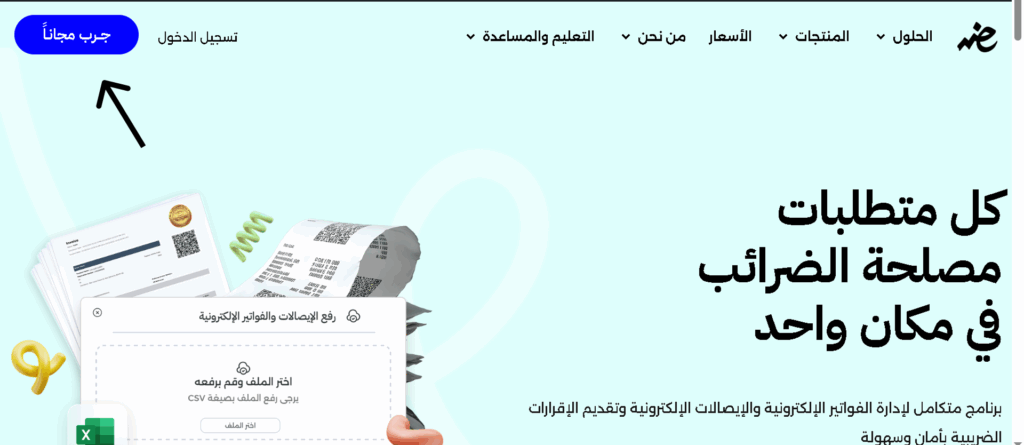
- Step 1: Access the platform—you can register or try it for free.
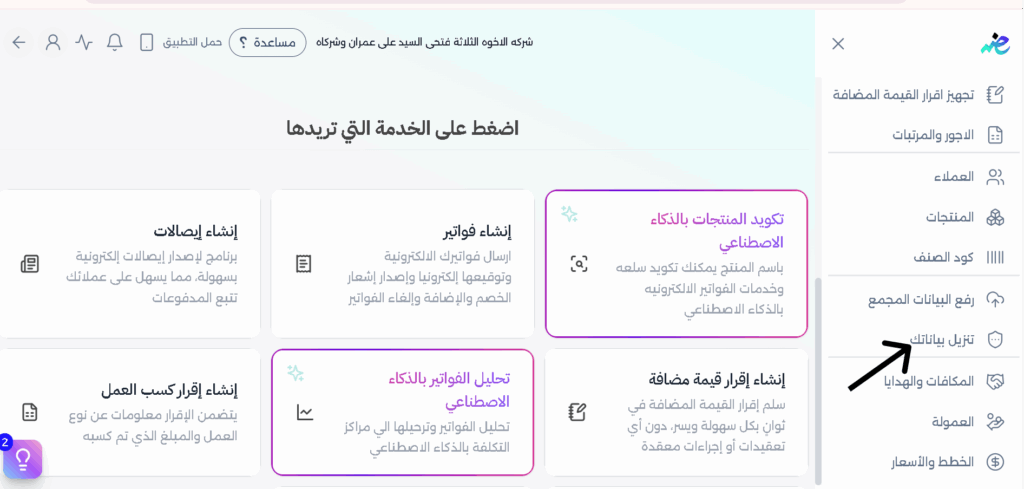
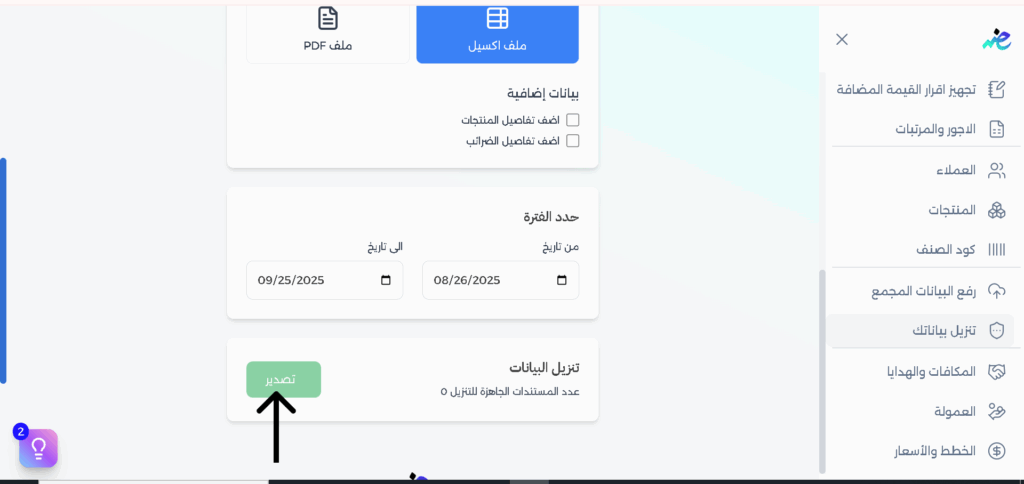
- Step 2: Select “Download Data.”
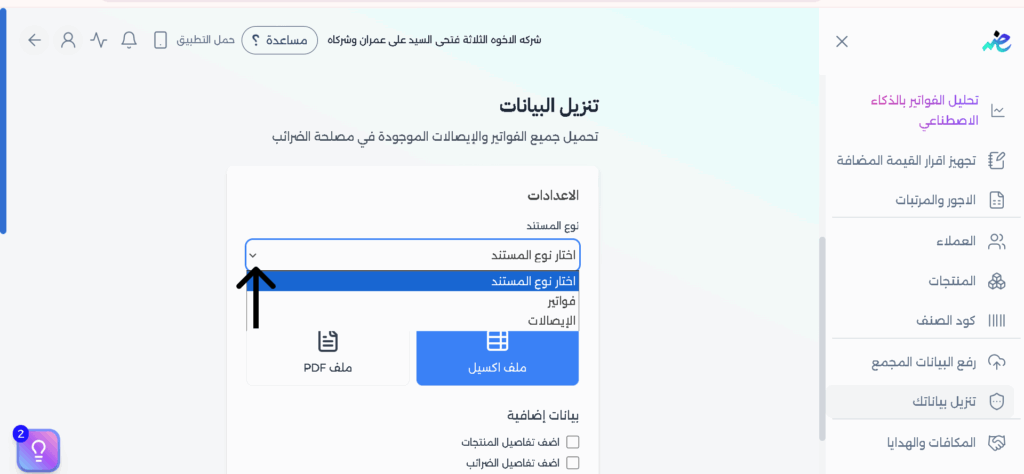
- Step 3: Choose the document type you want to download—invoices or receipts.
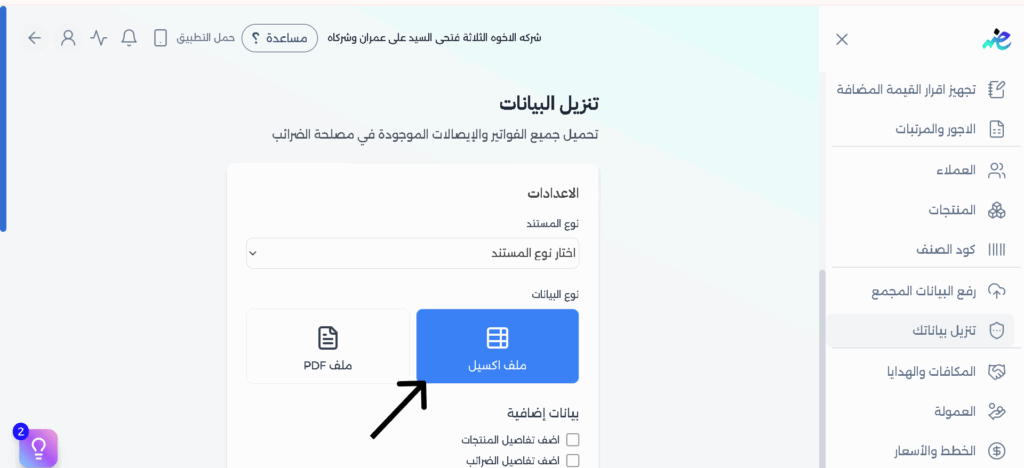
- Step 4: Select Excel file. You can also choose additional data. When connected to data, eDariba can load multiple invoices and send them in one go.
- Step 5: Select the time period for the invoices you want to download. Once the data is downloaded, click “Export.”
Frequently Asked Questions About E-Invoice Downloads
Can I download invoices in PDF format only?
No, the mentioned tools such as eDariba and Egypt ETA Tool also allow data export in Excel and CSV formats to facilitate accounting review.
Is using the Chrome extension safe?
The tool is open-source, but it’s always recommended to use official platforms like eDariba to ensure the highest levels of security and privacy for your tax data.
How can I download both purchase and sales invoices together?
Through the eDariba dashboard, you can filter documents and select “All,” then click “Export” to download all data in bulk.
Start Using the Free E-Invoice Download Tool Now
Conclusion
Ultimately, the transition to e-invoicing and e-receipts isn’t just a legal requirement—it’s a smart step toward managing your business more efficiently and building greater trust with clients and partners.
Now it’s easy and fast. Save time and effort with the eDariba platform by managing your invoices and receipts in an organized and secure way. And with your compliance to the new system, you’re always on the right track with the Tax Authority, ensuring the continuity of your business with confidence and professionalism.
Start now and register on eDariba in simple steps—always stay one step ahead